

English
Ludo Battle v1.0.0
1.0.0
Phiên bản
6 Th02 2024
Ngày cập nhật
0
Tải xuống
84.05MB
Dung lượng
Chia sẻ Ludo Battle
Tải xuống nhanh
Giới thiệu về Ludo Battle
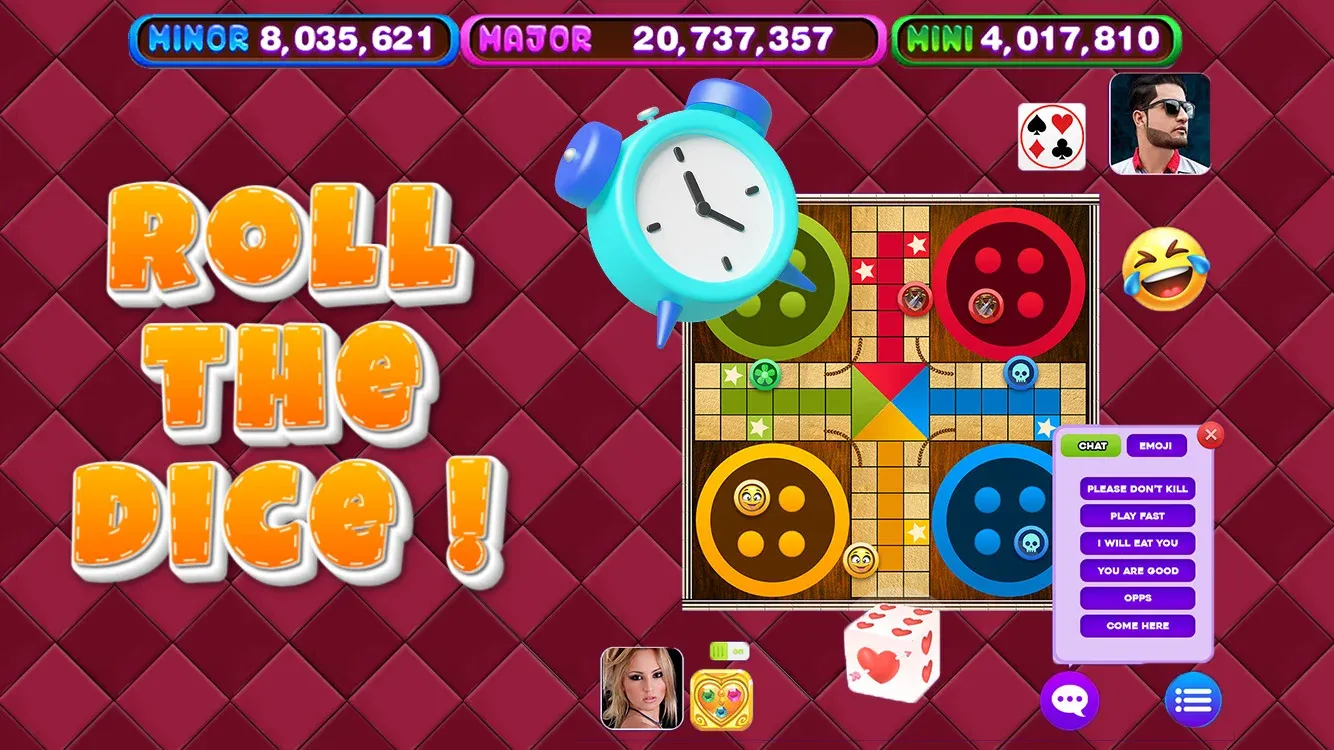
Hành động nhiều người chơi căng thẳng: Chơi với bạn bè trong các trận đấu nhiều người chơi trong thời gian thực hoặc kiểm tra kỹ năng của bạn trước các đối thủ AI đầy thách thức.
Lối chơi có thể tùy chỉnh: Chọn từ nhiều bộ quy tắc và thiết kế bảng khác nhau để điều chỉnh trò chơi theo sở thích của bạn.
Phần thưởng có thể mở khóa: Kiếm tiền và mở khóa các chủ đề bảng và thiết kế mã thông báo mới thú vị khi bạn tiến bộ trong trò chơi.
Bảng xếp hạng toàn cầu: Cạnh tranh để giành vị trí dẫn đầu trên bảng xếp hạng toàn cầu và chứng minh sự thống trị của bạn với tư cách là nhà vô địch Ludo cuối cùng.
Tính năng xã hội: Kết nối với bạn bè, gửi quà và trò chuyện với đối thủ khi bạn chiến đấu để giành chiến thắng.
Lối chơi có thể tùy chỉnh: Chọn từ nhiều bộ quy tắc và thiết kế bảng khác nhau để điều chỉnh trò chơi theo sở thích của bạn.
Phần thưởng có thể mở khóa: Kiếm tiền và mở khóa các chủ đề bảng và thiết kế mã thông báo mới thú vị khi bạn tiến bộ trong trò chơi.
Bảng xếp hạng toàn cầu: Cạnh tranh để giành vị trí dẫn đầu trên bảng xếp hạng toàn cầu và chứng minh sự thống trị của bạn với tư cách là nhà vô địch Ludo cuối cùng.
Tính năng xã hội: Kết nối với bạn bè, gửi quà và trò chuyện với đối thủ khi bạn chiến đấu để giành chiến thắng.
Thẻ
Thông tin bổ sung
Phiên bản mới nhất:
1.0.0
Loại:
Câu đốNhà cung cấp:
Scarecrow Party
Có sẵn vào:

Trò chơi này được người dùng tự tải lên, LeLeJoy chỉ cung cấp dịch vụ lưu trữ. Nếu có vấn đề về bản quyền, vui lòng liên hệ [email protected], chúng tôi sẽ xử lý kịp thời.
Thông tin bổ sung
Phiên bản mới nhất:
1.0.0
Loại:
Câu đốNhà cung cấp:
Scarecrow Party
Có sẵn vào:
Trò chơi này được người dùng tự tải lên, LeLeJoy chỉ cung cấp dịch vụ lưu trữ. Nếu có vấn đề về bản quyền, vui lòng liên hệ [email protected], chúng tôi sẽ xử lý kịp thời.
Tương tự như Ludo Battle










Recommended for you






Ludo Battle FAQ
1.How do I join a multiplayer game in Ludo Battle?
To join a multiplayer game, tap the 'Multiplayer' button, select a game mode, and wait for other players to join. Once enough players are available, the game will start.
2.Can I customize my pieces in Ludo Battle?
Yes, you can customize your pieces by going to the 'Settings' menu, selecting 'Customize', and choosing from various designs and colors.
3.What is the objective of the game in Ludo Battle?
The objective of the game is to be the first player to move all four of your pieces from the starting point to the home area. The first player to achieve this wins the game.
4.How do I roll the dice in Ludo Battle?
To roll the dice, tap the 'Roll' button. You can also choose to 'Auto Roll' if you prefer not to manually roll the dice.
Ludo Battle FAQ
1.How do I join a multiplayer game in Ludo Battle?
To join a multiplayer game, tap the 'Multiplayer' button, select a game mode, and wait for other players to join. Once enough players are available, the game will start.
2.Can I customize my pieces in Ludo Battle?
Yes, you can customize your pieces by going to the 'Settings' menu, selecting 'Customize', and choosing from various designs and colors.
3.What is the objective of the game in Ludo Battle?
The objective of the game is to be the first player to move all four of your pieces from the starting point to the home area. The first player to achieve this wins the game.
4.How do I roll the dice in Ludo Battle?
To roll the dice, tap the 'Roll' button. You can also choose to 'Auto Roll' if you prefer not to manually roll the dice.
Đánh giá
0.0
1
2
3
4
5
Xếp hạng ứng dụng này
Đánh giá
Chưa có đánh giá nào
![[object Object]](https://cfs-lele-res.lelejoy.com//xt_20231009160759/fltb_20231009160835/strategy_20240906151247.png)
![[object Object]](https://cfs-lele-res.lelejoy.com//xt_20231009160759/fltb_20231009160835/puzzle_20240906151806.png)
![[object Object]](https://cfs-lele-res.lelejoy.com//xt_20231009160759/fltb_20231009160835/board_20240906151319.png)
![[object Object]](https://cfs-lele-res.lelejoy.com//xt_20231009160759/fltb_20231009160835/educational_20240906151731.png)
![[object Object]](https://cfs-lele-res.lelejoy.com//xt_20231009160759/fltb_20231009160835/simulation_20240906151428.png)
![[object Object]](https://cfs-lele-res.lelejoy.com//xt_20231009160759/fltb_20231009160835/music_20240906151613.png)
![[object Object]](https://cfs-lele-res.lelejoy.com//xt_20231009160759/fltb_20231009160835/role playing_20240906150659.png)
![[object Object]](https://cfs-lele-res.lelejoy.com//xt_20231009160759/fltb_20231009160835/adventure_20240906150827.png)
![[object Object]](https://cfs-lele-res.lelejoy.com//xt_20231009160759/fltb_20231009160835/casual_20240906151116.png)
![[object Object]](https://cfs-lele-res.lelejoy.com//xt_20231009160759/fltb_20231009160835/cards_20240906150736.png)
![[object Object]](https://cfs-lele-res.lelejoy.com//xt_20231009160759/fltb_20231009160835/sports1_20241231162729.png)
![[object Object]](https://cfs-lele-res.lelejoy.com//xt_20231009160759/fltb_20231009160835/arcade_20240906151459.png)
![[object Object]](https://cfs-lele-res.lelejoy.com//xt_20231009160759/fltb_20231009160835/action_20240906150554.png)
![[object Object]](https://cfs-lele-res.lelejoy.com//xt_20231009160759/fltb_20231009160835/word_20240906151903.png)
![[object Object]](https://cfs-lele-res.lelejoy.com//xt_20231009160759/fltb_20231009160835/racing_20240906151358.png)
![[object Object]](https://cfs-lele-res.lelejoy.com//xt_20231009160759/fltb_20231009160835/trivia_20240906151841.png)

