

English

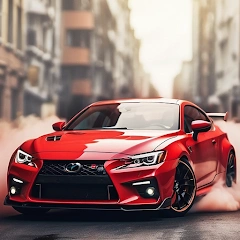
Drift Car City Traffic Racing v1.4
1.4
Phiên bản
22 Th03 2024
Ngày cập nhật
0
Tải xuống
55.55MB
Dung lượng
Chia sẻ Drift Car City Traffic Racing
Tải xuống nhanh
Tính năng mới
Drift car city traffic racing fever 2018 features:
-Super sense of speed
-Realistic simulation engine
-Choose your favorite models
-Free car racing driving gameplay.
-A variety of vehicles to choose any of you
-Drive fast boost your speed.
-Smooth control with precise steering
-Super sense of speed
-Realistic simulation engine
-Choose your favorite models
-Free car racing driving gameplay.
-A variety of vehicles to choose any of you
-Drive fast boost your speed.
-Smooth control with precise steering
Thông tin bổ sung
Phiên bản mới nhất:
1.4
Loại:
Đua xeNhà cung cấp:
iExtend Games
Có sẵn vào:

Trò chơi này được người dùng tự tải lên, LeLeJoy chỉ cung cấp dịch vụ lưu trữ. Nếu có vấn đề về bản quyền, vui lòng liên hệ [email protected], chúng tôi sẽ xử lý kịp thời.
Thông tin bổ sung
Phiên bản mới nhất:
1.4
Loại:
Đua xeNhà cung cấp:
iExtend Games
Có sẵn vào:
Trò chơi này được người dùng tự tải lên, LeLeJoy chỉ cung cấp dịch vụ lưu trữ. Nếu có vấn đề về bản quyền, vui lòng liên hệ [email protected], chúng tôi sẽ xử lý kịp thời.
Tương tự như Drift Car City Traffic Racing


Recommended for you

Drift Car City Traffic Racing FAQ
1.How do I control my car in Drift Car City Traffic Racing?
Use the touch controls on your screen to steer, accelerate, and brake. Tap the left side of the screen to turn left, right side for right turns. Press and hold the accelerator button to speed up and the brake button to slow down or stop.
2.Can I customize my car in Drift Car City Traffic Racing?
Yes, you can customize your car's look with different colors, decals, and wheels from the garage menu. Some customizations may require in-game currency or real money purchases.
3.What are the drifting mechanics in Drift Car City Traffic Racing?
To perform a drift, tap and hold the brake button while turning. Keep holding to maintain the drift. Timing is key for achieving longer drifts and earning more points.
4.How do I unlock new cars in Drift Car City Traffic Racing?
Unlock new cars by completing missions, reaching certain levels, or purchasing them with in-game currency or real money in the shop.
Drift Car City Traffic Racing FAQ
1.How do I control my car in Drift Car City Traffic Racing?
Use the touch controls on your screen to steer, accelerate, and brake. Tap the left side of the screen to turn left, right side for right turns. Press and hold the accelerator button to speed up and the brake button to slow down or stop.
2.Can I customize my car in Drift Car City Traffic Racing?
Yes, you can customize your car's look with different colors, decals, and wheels from the garage menu. Some customizations may require in-game currency or real money purchases.
3.What are the drifting mechanics in Drift Car City Traffic Racing?
To perform a drift, tap and hold the brake button while turning. Keep holding to maintain the drift. Timing is key for achieving longer drifts and earning more points.
4.How do I unlock new cars in Drift Car City Traffic Racing?
Unlock new cars by completing missions, reaching certain levels, or purchasing them with in-game currency or real money in the shop.
Đánh giá
0.0
1
2
3
4
5
Xếp hạng ứng dụng này
Đánh giá
Chưa có đánh giá nào
![[object Object]](https://cfs-lele-res.lelejoy.com//xt_20231009160759/fltb_20231009160835/strategy_20240906151247.png)
![[object Object]](https://cfs-lele-res.lelejoy.com//xt_20231009160759/fltb_20231009160835/puzzle_20240906151806.png)
![[object Object]](https://cfs-lele-res.lelejoy.com//xt_20231009160759/fltb_20231009160835/board_20240906151319.png)
![[object Object]](https://cfs-lele-res.lelejoy.com//xt_20231009160759/fltb_20231009160835/educational_20240906151731.png)
![[object Object]](https://cfs-lele-res.lelejoy.com//xt_20231009160759/fltb_20231009160835/simulation_20240906151428.png)
![[object Object]](https://cfs-lele-res.lelejoy.com//xt_20231009160759/fltb_20231009160835/music_20240906151613.png)
![[object Object]](https://cfs-lele-res.lelejoy.com//xt_20231009160759/fltb_20231009160835/role playing_20240906150659.png)
![[object Object]](https://cfs-lele-res.lelejoy.com//xt_20231009160759/fltb_20231009160835/adventure_20240906150827.png)
![[object Object]](https://cfs-lele-res.lelejoy.com//xt_20231009160759/fltb_20231009160835/casual_20240906151116.png)
![[object Object]](https://cfs-lele-res.lelejoy.com//xt_20231009160759/fltb_20231009160835/cards_20240906150736.png)
![[object Object]](https://cfs-lele-res.lelejoy.com//xt_20231009160759/fltb_20231009160835/sports1_20241231162729.png)
![[object Object]](https://cfs-lele-res.lelejoy.com//xt_20231009160759/fltb_20231009160835/arcade_20240906151459.png)
![[object Object]](https://cfs-lele-res.lelejoy.com//xt_20231009160759/fltb_20231009160835/action_20240906150554.png)
![[object Object]](https://cfs-lele-res.lelejoy.com//xt_20231009160759/fltb_20231009160835/word_20240906151903.png)
![[object Object]](https://cfs-lele-res.lelejoy.com//xt_20231009160759/fltb_20231009160835/racing_20240906151358.png)
![[object Object]](https://cfs-lele-res.lelejoy.com//xt_20231009160759/fltb_20231009160835/trivia_20240906151841.png)

