

English

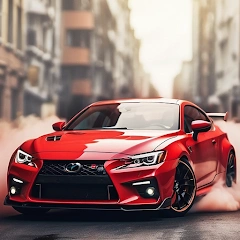
Drift Car City Traffic Racing v1.4
1.4
版本
2024年3月22日
更新日期
0
下載次數
55.55MB
文件大小
分享 Drift Car City Traffic Racing
快速下載
關於此應用程式
Drift car city traffic racing fever 2018 features:
-Super sense of speed
-Realistic simulation engine
-Choose your favorite models
-Free car racing driving gameplay.
-A variety of vehicles to choose any of you
-Drive fast boost your speed.
-Smooth control with precise steering
-Super sense of speed
-Realistic simulation engine
-Choose your favorite models
-Free car racing driving gameplay.
-A variety of vehicles to choose any of you
-Drive fast boost your speed.
-Smooth control with precise steering
更多信息
最新版本:
1.4
遊戲類別:
競速提供者:
iExtend Games
可用於:

該遊戲由用戶自行上傳,LeLeJoy僅提供存儲服務。如有版權問題,請聯繫[email protected],我們會及時處理。
更多信息
最新版本:
1.4
遊戲類別:
競速提供者:
iExtend Games
可用於:
該遊戲由用戶自行上傳,LeLeJoy僅提供存儲服務。如有版權問題,請聯繫[email protected],我們會及時處理。
所有版本
所有版本
類似於 Drift Car City Traffic Racing



為您推薦

Drift Car City Traffic Racing FAQ
1.How do I control my car in Drift Car City Traffic Racing?
Use the touch controls on your screen to steer, accelerate, and brake. Tap the left side of the screen to turn left, right side for right turns. Press and hold the accelerator button to speed up and the brake button to slow down or stop.
2.Can I customize my car in Drift Car City Traffic Racing?
Yes, you can customize your car's look with different colors, decals, and wheels from the garage menu. Some customizations may require in-game currency or real money purchases.
3.What are the drifting mechanics in Drift Car City Traffic Racing?
To perform a drift, tap and hold the brake button while turning. Keep holding to maintain the drift. Timing is key for achieving longer drifts and earning more points.
4.How do I unlock new cars in Drift Car City Traffic Racing?
Unlock new cars by completing missions, reaching certain levels, or purchasing them with in-game currency or real money in the shop.
Drift Car City Traffic Racing FAQ
1.How do I control my car in Drift Car City Traffic Racing?
Use the touch controls on your screen to steer, accelerate, and brake. Tap the left side of the screen to turn left, right side for right turns. Press and hold the accelerator button to speed up and the brake button to slow down or stop.
2.Can I customize my car in Drift Car City Traffic Racing?
Yes, you can customize your car's look with different colors, decals, and wheels from the garage menu. Some customizations may require in-game currency or real money purchases.
3.What are the drifting mechanics in Drift Car City Traffic Racing?
To perform a drift, tap and hold the brake button while turning. Keep holding to maintain the drift. Timing is key for achieving longer drifts and earning more points.
4.How do I unlock new cars in Drift Car City Traffic Racing?
Unlock new cars by completing missions, reaching certain levels, or purchasing them with in-game currency or real money in the shop.
評論
0.0
1
2
3
4
5
為這個應用程式評分
評論
暫無評論
![[object Object]](https://cfs-lele-res.lelejoy.com//xt_20231009160759/fltb_20231009160835/casual_20240906151116.png)
![[object Object]](https://cfs-lele-res.lelejoy.com//xt_20231009160759/fltb_20231009160835/adventure_20240906150827.png)
![[object Object]](https://cfs-lele-res.lelejoy.com//xt_20231009160759/fltb_20231009160835/action_20240906150554.png)
![[object Object]](https://cfs-lele-res.lelejoy.com//xt_20231009160759/fltb_20231009160835/word_20240906151903.png)
![[object Object]](https://cfs-lele-res.lelejoy.com//xt_20231009160759/fltb_20231009160835/educational_20240906151731.png)
![[object Object]](https://cfs-lele-res.lelejoy.com//xt_20231009160759/fltb_20231009160835/board_20240906151319.png)
![[object Object]](https://cfs-lele-res.lelejoy.com//xt_20231009160759/fltb_20231009160835/simulation_20240906151428.png)
![[object Object]](https://cfs-lele-res.lelejoy.com//xt_20231009160759/fltb_20231009160835/trivia_20240906151841.png)
![[object Object]](https://cfs-lele-res.lelejoy.com//xt_20231009160759/fltb_20231009160835/racing_20240906151358.png)
![[object Object]](https://cfs-lele-res.lelejoy.com//xt_20231009160759/fltb_20231009160835/strategy_20240906151247.png)
![[object Object]](https://cfs-lele-res.lelejoy.com//xt_20231009160759/fltb_20231009160835/cards_20240906150736.png)
![[object Object]](https://cfs-lele-res.lelejoy.com//xt_20231009160759/fltb_20231009160835/arcade_20240906151459.png)
![[object Object]](https://cfs-lele-res.lelejoy.com//xt_20231009160759/fltb_20231009160835/role playing_20240906150659.png)
![[object Object]](https://cfs-lele-res.lelejoy.com//xt_20231009160759/fltb_20231009160835/puzzle_20240906151806.png)
![[object Object]](https://cfs-lele-res.lelejoy.com//xt_20231009160759/fltb_20231009160835/music_20240906151613.png)
![[object Object]](https://cfs-lele-res.lelejoy.com//xt_20231009160759/fltb_20231009160835/sports1_20241231162729.png)

