

English

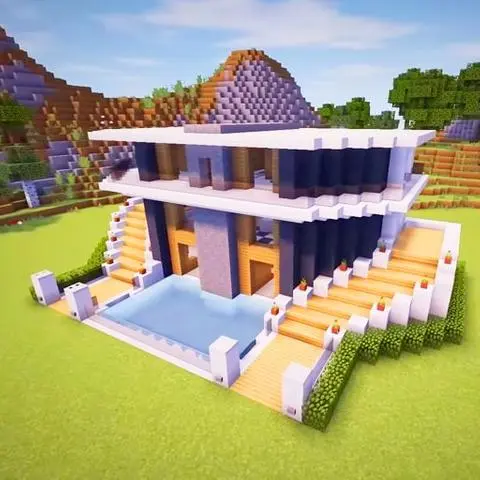
Craft World Master Block 3D v420511
420511
版本
2023年8月22日
更新日期
105369
下載次數
173.27MB
文件大小
分享 Craft World Master Block 3D
快速下載
關於 Craft World Master Block 3D
一個令人驚嘆的無限塊狀開放世界,可通過工藝和探索來構建。 打造您的夢想家園,此Pro 3D版本可為您提供一切。 探索這個世界,開始實現您的夢想和想像力。 每天都是新的挑戰。 建造一所簡單的房子或製作您夢想中的城堡,一切就在您手中。 獲取不同的塊並製作它們以獲得所需的輸出。 享受美麗的3D遊戲圖形。 簡單直觀的用戶界面。 立即開始探索。 在無限的土地上飛行或漫步。 您的選擇和選擇是無限的。 遊戲特色: -深入的教程和大量3D元素 -程序生成的開放世界沙盒環境 -使用塊和其他元素創建自己的城堡 -行走和飛行以展現不同的觀點。 最新版本420511更新日誌 Last updated on 2023年08月22日 Minor bug fixes and improvements. Install or update to the newest version to check it out!
標籤
更多信息
最新版本:
420511
遊戲類別:
模擬提供者:
Master Craft Game 3D
可用於:

該遊戲由用戶自行上傳,LeLeJoy僅提供存儲服務。如有版權問題,請聯繫[email protected],我們會及時處理。
更多信息
最新版本:
420511
遊戲類別:
模擬提供者:
Master Craft Game 3D
可用於:
該遊戲由用戶自行上傳,LeLeJoy僅提供存儲服務。如有版權問題,請聯繫[email protected],我們會及時處理。
類似於 Craft World Master Block 3D






為您推薦
Craft World Master Block 3D FAQ
1.How to create a custom block design in Craft World Master Block 3D?
To create a custom block design, select the 'Design' mode, use the available tools to draw your design on the canvas, then press 'Save' to add it to your inventory.
2.Can I change the color of existing blocks in the game?
Yes, you can change the color of any block by selecting it and using the color palette located on the right side of the screen.
3.What are the different modes available in Craft World Master Block 3D?
The game offers three main modes: 'Create', 'Explore', and 'Adventure'. 'Create' lets you build and design, 'Explore' allows you to find hidden blocks, and 'Adventure' involves completing challenges.
4.How do I increase my crafting level in Craft World Master Block 3D?
Increase your crafting level by successfully completing more complex tasks in the 'Adventure' mode. Higher levels unlock new tools and designs.
Craft World Master Block 3D FAQ
1.How to create a custom block design in Craft World Master Block 3D?
To create a custom block design, select the 'Design' mode, use the available tools to draw your design on the canvas, then press 'Save' to add it to your inventory.
2.Can I change the color of existing blocks in the game?
Yes, you can change the color of any block by selecting it and using the color palette located on the right side of the screen.
3.What are the different modes available in Craft World Master Block 3D?
The game offers three main modes: 'Create', 'Explore', and 'Adventure'. 'Create' lets you build and design, 'Explore' allows you to find hidden blocks, and 'Adventure' involves completing challenges.
4.How do I increase my crafting level in Craft World Master Block 3D?
Increase your crafting level by successfully completing more complex tasks in the 'Adventure' mode. Higher levels unlock new tools and designs.
評論
3.4
1
2
3
4
5
為這個應用程式評分
評論
暫無評論
![[object Object]](https://cfs-lele-res.lelejoy.com//xt_20231009160759/fltb_20231009160835/casual_20240906151116.png)
![[object Object]](https://cfs-lele-res.lelejoy.com//xt_20231009160759/fltb_20231009160835/adventure_20240906150827.png)
![[object Object]](https://cfs-lele-res.lelejoy.com//xt_20231009160759/fltb_20231009160835/action_20240906150554.png)
![[object Object]](https://cfs-lele-res.lelejoy.com//xt_20231009160759/fltb_20231009160835/word_20240906151903.png)
![[object Object]](https://cfs-lele-res.lelejoy.com//xt_20231009160759/fltb_20231009160835/educational_20240906151731.png)
![[object Object]](https://cfs-lele-res.lelejoy.com//xt_20231009160759/fltb_20231009160835/board_20240906151319.png)
![[object Object]](https://cfs-lele-res.lelejoy.com//xt_20231009160759/fltb_20231009160835/simulation_20240906151428.png)
![[object Object]](https://cfs-lele-res.lelejoy.com//xt_20231009160759/fltb_20231009160835/trivia_20240906151841.png)
![[object Object]](https://cfs-lele-res.lelejoy.com//xt_20231009160759/fltb_20231009160835/racing_20240906151358.png)
![[object Object]](https://cfs-lele-res.lelejoy.com//xt_20231009160759/fltb_20231009160835/strategy_20240906151247.png)
![[object Object]](https://cfs-lele-res.lelejoy.com//xt_20231009160759/fltb_20231009160835/cards_20240906150736.png)
![[object Object]](https://cfs-lele-res.lelejoy.com//xt_20231009160759/fltb_20231009160835/arcade_20240906151459.png)
![[object Object]](https://cfs-lele-res.lelejoy.com//xt_20231009160759/fltb_20231009160835/role playing_20240906150659.png)
![[object Object]](https://cfs-lele-res.lelejoy.com//xt_20231009160759/fltb_20231009160835/puzzle_20240906151806.png)
![[object Object]](https://cfs-lele-res.lelejoy.com//xt_20231009160759/fltb_20231009160835/music_20240906151613.png)
![[object Object]](https://cfs-lele-res.lelejoy.com//xt_20231009160759/fltb_20231009160835/sports1_20241231162729.png)

