

English
Ludo Battle v1.0.0
1.0.0
Bersyon
Peb 6, 2024
Na-update noong
0
Mga download
84.05MB
Laki
Ibahagi Ludo Battle
Mabilis na Pag-download
Tungkol sa Ludo Battle
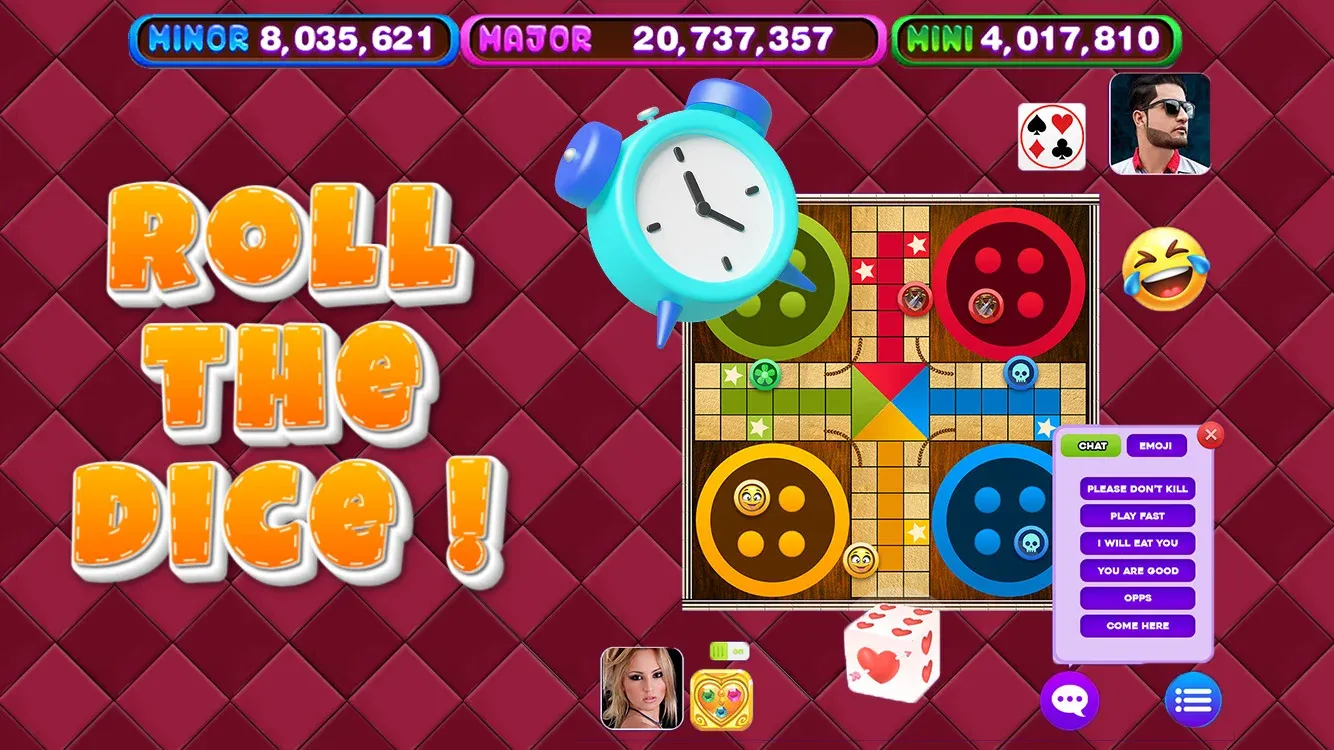
Matinding Multiplayer na Aksyon: Maglaro laban sa mga kaibigan sa real-time na mga multiplayer na laban o subukan ang iyong mga kasanayan laban sa mapaghamong mga kalaban ng AI.
Nako-customize na Gameplay: Pumili mula sa iba't ibang hanay ng panuntunan at disenyo ng board upang maiangkop ang laro sa iyong mga kagustuhan.
Mga Na-unlock na Gantimpala: Makakuha ng mga barya at mag-unlock ng mga kapana-panabik na bagong tema ng board at mga disenyo ng token habang sumusulong ka sa laro.
Mga Pandaigdigang Leaderboard: Makipagkumpitensya para sa nangungunang puwesto sa mga pandaigdigang leaderboard at patunayan ang iyong pangingibabaw bilang ang tunay na kampeon sa Ludo.
Mga Social na Feature: Kumonekta sa mga kaibigan, magpadala ng mga regalo, at makipag-chat sa mga kalaban habang nakikipaglaban ka sa tagumpay.
Nako-customize na Gameplay: Pumili mula sa iba't ibang hanay ng panuntunan at disenyo ng board upang maiangkop ang laro sa iyong mga kagustuhan.
Mga Na-unlock na Gantimpala: Makakuha ng mga barya at mag-unlock ng mga kapana-panabik na bagong tema ng board at mga disenyo ng token habang sumusulong ka sa laro.
Mga Pandaigdigang Leaderboard: Makipagkumpitensya para sa nangungunang puwesto sa mga pandaigdigang leaderboard at patunayan ang iyong pangingibabaw bilang ang tunay na kampeon sa Ludo.
Mga Social na Feature: Kumonekta sa mga kaibigan, magpadala ng mga regalo, at makipag-chat sa mga kalaban habang nakikipaglaban ka sa tagumpay.
Mga Tag
Karagdagang impormasyon
Pinakabagong Bersyon:
1.0.0
Mga Kategorya:
PuzzleIniaalok ng:
Scarecrow Party
Magagamit sa:

Ang larong ito ay in-upload ng mga user, at ang LeLeJoy ay nagbibigay lamang ng serbisyo sa pag-iimbak. Kung mayroong anumang mga isyu sa copyright, mangyaring makipag-ugnayan sa [email protected], at agad naming ito aasikasuhin.
Karagdagang impormasyon
Pinakabagong Bersyon:
1.0.0
Mga Kategorya:
PuzzleIniaalok ng:
Scarecrow Party
Magagamit sa:
Ang larong ito ay in-upload ng mga user, at ang LeLeJoy ay nagbibigay lamang ng serbisyo sa pag-iimbak. Kung mayroong anumang mga isyu sa copyright, mangyaring makipag-ugnayan sa [email protected], at agad naming ito aasikasuhin.
Katulad ng Ludo Battle










Inirerekomenda para sa iyo








Ludo Battle FAQ
1.How do I join a multiplayer game in Ludo Battle?
To join a multiplayer game, tap the 'Multiplayer' button, select a game mode, and wait for other players to join. Once enough players are available, the game will start.
2.Can I customize my pieces in Ludo Battle?
Yes, you can customize your pieces by going to the 'Settings' menu, selecting 'Customize', and choosing from various designs and colors.
3.What is the objective of the game in Ludo Battle?
The objective of the game is to be the first player to move all four of your pieces from the starting point to the home area. The first player to achieve this wins the game.
4.How do I roll the dice in Ludo Battle?
To roll the dice, tap the 'Roll' button. You can also choose to 'Auto Roll' if you prefer not to manually roll the dice.
Ludo Battle FAQ
1.How do I join a multiplayer game in Ludo Battle?
To join a multiplayer game, tap the 'Multiplayer' button, select a game mode, and wait for other players to join. Once enough players are available, the game will start.
2.Can I customize my pieces in Ludo Battle?
Yes, you can customize your pieces by going to the 'Settings' menu, selecting 'Customize', and choosing from various designs and colors.
3.What is the objective of the game in Ludo Battle?
The objective of the game is to be the first player to move all four of your pieces from the starting point to the home area. The first player to achieve this wins the game.
4.How do I roll the dice in Ludo Battle?
To roll the dice, tap the 'Roll' button. You can also choose to 'Auto Roll' if you prefer not to manually roll the dice.
Mga rating at review
0.0
1
2
3
4
5
I-rate ang app na ito
Mga rating at review
Walang mga review pa
![[object Object]](https://cfs-lele-res.lelejoy.com//xt_20231009160759/fltb_20231009160835/adventure_20240906150827.png)
![[object Object]](https://cfs-lele-res.lelejoy.com//xt_20231009160759/fltb_20231009160835/action_20240906150554.png)
![[object Object]](https://cfs-lele-res.lelejoy.com//xt_20231009160759/fltb_20231009160835/arcade_20240906151459.png)
![[object Object]](https://cfs-lele-res.lelejoy.com//xt_20231009160759/fltb_20231009160835/board_20240906151319.png)
![[object Object]](https://cfs-lele-res.lelejoy.com//xt_20231009160759/fltb_20231009160835/educational_20240906151731.png)
![[object Object]](https://cfs-lele-res.lelejoy.com//xt_20231009160759/fltb_20231009160835/strategy_20240906151247.png)
![[object Object]](https://cfs-lele-res.lelejoy.com//xt_20231009160759/fltb_20231009160835/racing_20240906151358.png)
![[object Object]](https://cfs-lele-res.lelejoy.com//xt_20231009160759/fltb_20231009160835/casual_20240906151116.png)
![[object Object]](https://cfs-lele-res.lelejoy.com//xt_20231009160759/fltb_20231009160835/cards_20240906150736.png)
![[object Object]](https://cfs-lele-res.lelejoy.com//xt_20231009160759/fltb_20231009160835/music_20240906151613.png)
![[object Object]](https://cfs-lele-res.lelejoy.com//xt_20231009160759/fltb_20231009160835/role playing_20240906150659.png)
![[object Object]](https://cfs-lele-res.lelejoy.com//xt_20231009160759/fltb_20231009160835/puzzle_20240906151806.png)
![[object Object]](https://cfs-lele-res.lelejoy.com//xt_20231009160759/fltb_20231009160835/word_20240906151903.png)
![[object Object]](https://cfs-lele-res.lelejoy.com//xt_20231009160759/fltb_20231009160835/simulation_20240906151428.png)
![[object Object]](https://cfs-lele-res.lelejoy.com//xt_20231009160759/fltb_20231009160835/sports1_20241231162729.png)
![[object Object]](https://cfs-lele-res.lelejoy.com//xt_20231009160759/fltb_20231009160835/trivia_20240906151841.png)

