

English
Cringe the Cat - Music Game v4.1
4.1
Bersyon
Ene 28, 2024
Na-update noong
0
Mga download
106.78MB
Laki
Ibahagi Cringe the Cat - Music Game
Mabilis na Pag-download
Tungkol sa Cringe the Cat - Music Game
Mga Tag
Ano'ng bago
- Added "Disable Vibration" setting!
- Huge increase to responsiveness and performance of the game!
- Added DELAY CALIBRATION into settings!
- NEW WORLD! 8 new songs and the Cyberpunk world is now live!
- Some old songs got replaced with totally new ones in Vanilla and Metal Hell world!
- Huge increase to responsiveness and performance of the game!
- Added DELAY CALIBRATION into settings!
- NEW WORLD! 8 new songs and the Cyberpunk world is now live!
- Some old songs got replaced with totally new ones in Vanilla and Metal Hell world!
Karagdagang impormasyon
Pinakabagong Bersyon:
4.1
Mga Kategorya:
MusikaIniaalok ng:
One Cat Studio
Magagamit sa:

Ang larong ito ay in-upload ng mga user, at ang LeLeJoy ay nagbibigay lamang ng serbisyo sa pag-iimbak. Kung mayroong anumang mga isyu sa copyright, mangyaring makipag-ugnayan sa [email protected], at agad naming ito aasikasuhin.
Karagdagang impormasyon
Pinakabagong Bersyon:
4.1
Mga Kategorya:
MusikaIniaalok ng:
One Cat Studio
Magagamit sa:
Ang larong ito ay in-upload ng mga user, at ang LeLeJoy ay nagbibigay lamang ng serbisyo sa pag-iimbak. Kung mayroong anumang mga isyu sa copyright, mangyaring makipag-ugnayan sa [email protected], at agad naming ito aasikasuhin.
Katulad ng Cringe the Cat - Music Game






Inirerekomenda para sa iyo







Cringe the Cat - Music Game FAQ
1.How do I control Cringe the Cat in the game?
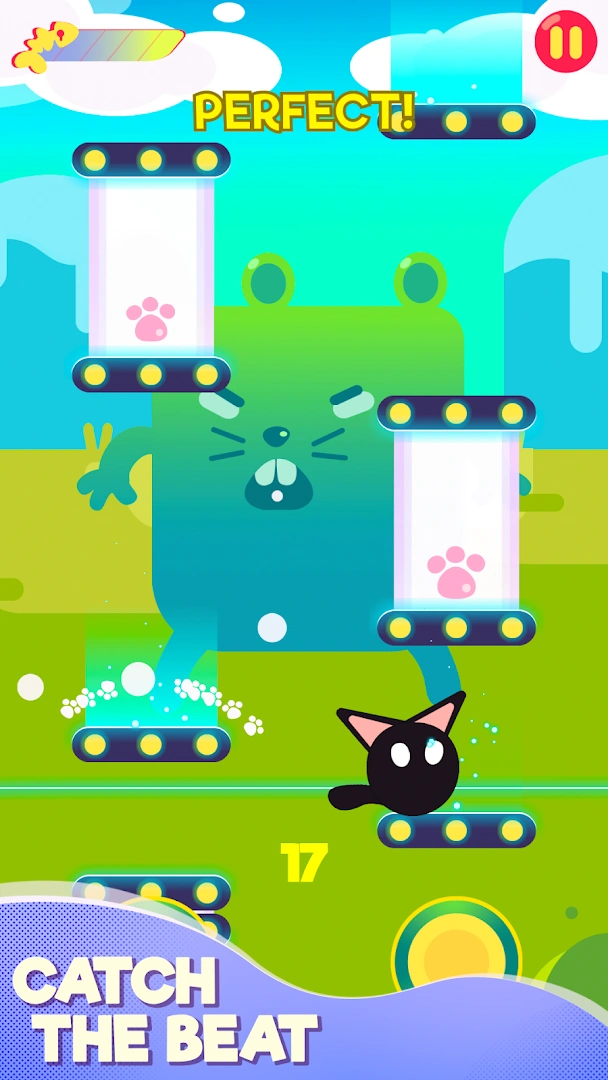
You control Cringe the Cat by tapping the screen to jump over obstacles and matching rhythm with the music.
2.Can I change the difficulty level of the game?
Yes, you can adjust the difficulty by selecting different levels which affect the speed of the obstacles and complexity of the rhythm.
3.What happens if I miss an obstacle or a beat in Cringe the Cat?
Missing an obstacle or a beat results in a game over. You can then restart from the last checkpoint or the beginning of the level.
4.Is there a scoring system in Cringe the Cat - Music Game?
Yes, your score is calculated based on how many obstacles you successfully jump over and beats you match with the music rhythm.
Cringe the Cat - Music Game FAQ
1.How do I control Cringe the Cat in the game?
You control Cringe the Cat by tapping the screen to jump over obstacles and matching rhythm with the music.
2.Can I change the difficulty level of the game?
Yes, you can adjust the difficulty by selecting different levels which affect the speed of the obstacles and complexity of the rhythm.
3.What happens if I miss an obstacle or a beat in Cringe the Cat?
Missing an obstacle or a beat results in a game over. You can then restart from the last checkpoint or the beginning of the level.
4.Is there a scoring system in Cringe the Cat - Music Game?
Yes, your score is calculated based on how many obstacles you successfully jump over and beats you match with the music rhythm.
Mga rating at review
0.0
1
2
3
4
5
I-rate ang app na ito
Mga rating at review
Walang mga review pa
![[object Object]](https://cfs-lele-res.lelejoy.com//xt_20231009160759/fltb_20231009160835/adventure_20240906150827.png)
![[object Object]](https://cfs-lele-res.lelejoy.com//xt_20231009160759/fltb_20231009160835/action_20240906150554.png)
![[object Object]](https://cfs-lele-res.lelejoy.com//xt_20231009160759/fltb_20231009160835/arcade_20240906151459.png)
![[object Object]](https://cfs-lele-res.lelejoy.com//xt_20231009160759/fltb_20231009160835/board_20240906151319.png)
![[object Object]](https://cfs-lele-res.lelejoy.com//xt_20231009160759/fltb_20231009160835/educational_20240906151731.png)
![[object Object]](https://cfs-lele-res.lelejoy.com//xt_20231009160759/fltb_20231009160835/strategy_20240906151247.png)
![[object Object]](https://cfs-lele-res.lelejoy.com//xt_20231009160759/fltb_20231009160835/racing_20240906151358.png)
![[object Object]](https://cfs-lele-res.lelejoy.com//xt_20231009160759/fltb_20231009160835/casual_20240906151116.png)
![[object Object]](https://cfs-lele-res.lelejoy.com//xt_20231009160759/fltb_20231009160835/cards_20240906150736.png)
![[object Object]](https://cfs-lele-res.lelejoy.com//xt_20231009160759/fltb_20231009160835/music_20240906151613.png)
![[object Object]](https://cfs-lele-res.lelejoy.com//xt_20231009160759/fltb_20231009160835/role playing_20240906150659.png)
![[object Object]](https://cfs-lele-res.lelejoy.com//xt_20231009160759/fltb_20231009160835/puzzle_20240906151806.png)
![[object Object]](https://cfs-lele-res.lelejoy.com//xt_20231009160759/fltb_20231009160835/word_20240906151903.png)
![[object Object]](https://cfs-lele-res.lelejoy.com//xt_20231009160759/fltb_20231009160835/simulation_20240906151428.png)
![[object Object]](https://cfs-lele-res.lelejoy.com//xt_20231009160759/fltb_20231009160835/sports1_20241231162729.png)
![[object Object]](https://cfs-lele-res.lelejoy.com//xt_20231009160759/fltb_20231009160835/trivia_20240906151841.png)

