

English

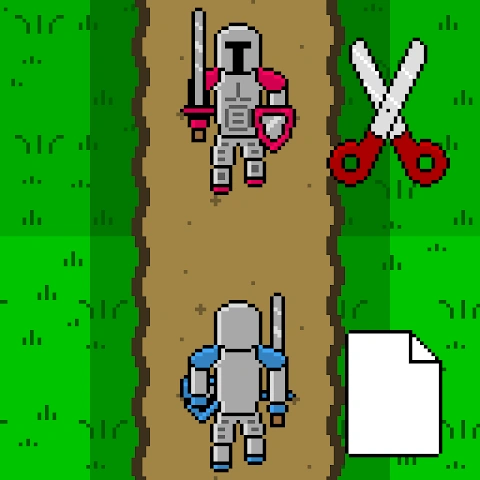
Rock Paper Scissors Battle v1.34
1.34
เวอร์ชัน
15 มิ.ย. 2024
อัปเดตเมื่อ
0
ดาวน์โหลด
22.65MB
ขนาด
แบ่งปัน Rock Paper Scissors Battle
ดาวน์โหลดเร็ว
เกี่ยวกับ Rock Paper Scissors Battle
สงครามจะไม่ง่ายกว่านี้มากนักและยอมรับเถอะว่าถูกกว่าถ้าเราสามารถต่อสู้ด้วยวิธีหินกระดาษกรรไกรที่ผ่านการทดลองและทดสอบแล้ว? ตอนนี้คุณทำได้แล้ว! ยังไงก็ตาม
ต่อสู้กับ CPU หรือผู้เล่นคนอื่นทางออนไลน์และพยายามยึดปราสาทของพวกเขา ปราสาทแต่ละหลังมีอัศวิน 3 คนที่สามารถติดตั้งหิน กระดาษ หรือกรรไกรได้ เลือกอาวุธของคุณและส่งทหารของคุณเพื่อเอาชนะคู่ต่อสู้และยึดปราสาทของพวกเขา!
กฎง่ายๆ:
ร็อคชนะกรรไกร
กรรไกรชนะกระดาษ
Paper Beats Rock
คุณสมบัติ
* เล่นออนไลน์ได้ทันที - ไม่จำเป็นต้องสร้างบัญชี
* การแข่งขันจัดอันดับ
* เล่นคนเดียวกับ CPU
* การควบคุมหน้าจอสัมผัสที่เรียบง่าย
ต่อสู้กับ CPU หรือผู้เล่นคนอื่นทางออนไลน์และพยายามยึดปราสาทของพวกเขา ปราสาทแต่ละหลังมีอัศวิน 3 คนที่สามารถติดตั้งหิน กระดาษ หรือกรรไกรได้ เลือกอาวุธของคุณและส่งทหารของคุณเพื่อเอาชนะคู่ต่อสู้และยึดปราสาทของพวกเขา!
กฎง่ายๆ:
ร็อคชนะกรรไกร
กรรไกรชนะกระดาษ
Paper Beats Rock
คุณสมบัติ
* เล่นออนไลน์ได้ทันที - ไม่จำเป็นต้องสร้างบัญชี
* การแข่งขันจัดอันดับ
* เล่นคนเดียวกับ CPU
* การควบคุมหน้าจอสัมผัสที่เรียบง่าย
แท็ก
มีอะไรใหม่
Stability and compatibility fixes
ข้อมูลเพิ่มเติม
เวอร์ชันล่าสุด:
1.34
หมวดหมู่:
ง่ายๆเสนอโดย:
Parallel Realities
พร้อมใช้งานใน:

เกมนี้อัปโหลดโดยผู้ใช้เอง โดย LeLeJoy เพียงให้บิการเก็บข้อมูลเท่านั้น หากมีปัญหาเกี่ยวกับลิขสิทธิ์ โปรดติดต่อ [email protected] และเราจะดำเนินการอย่างทันท่วงที
ข้อมูลเพิ่มเติม
เวอร์ชันล่าสุด:
1.34
หมวดหมู่:
ง่ายๆเสนอโดย:
Parallel Realities
พร้อมใช้งานใน:
เกมนี้อัปโหลดโดยผู้ใช้เอง โดย LeLeJoy เพียงให้บิการเก็บข้อมูลเท่านั้น หากมีปัญหาเกี่ยวกับลิขสิทธิ์ โปรดติดต่อ [email protected] และเราจะดำเนินการอย่างทันท่วงที
คล้ายกับ Rock Paper Scissors Battle








แนะนำสำหรับคุณ





Rock Paper Scissors Battle FAQ
1.How can I choose my moves in Rock Paper Scissors Battle?
In the game, simply tap on the rock, paper, or scissors button to make your choice for each round.
2.Can I see the results of previous games in Rock Paper Scissors Battle?
Yes, you can review past games and results through the 'History' section of the game menu.
3.Is there a way to customize the difficulty level in Rock Paper Scissors Battle?
Adjust the game difficulty by selecting 'Settings' then choosing 'Difficulty' option.
4.How do I reset my game statistics in Rock Paper Scissors Battle?
To reset your stats, go to 'Settings', select 'Reset Stats', and confirm your action.
Rock Paper Scissors Battle FAQ
1.How can I choose my moves in Rock Paper Scissors Battle?
In the game, simply tap on the rock, paper, or scissors button to make your choice for each round.
2.Can I see the results of previous games in Rock Paper Scissors Battle?
Yes, you can review past games and results through the 'History' section of the game menu.
3.Is there a way to customize the difficulty level in Rock Paper Scissors Battle?
Adjust the game difficulty by selecting 'Settings' then choosing 'Difficulty' option.
4.How do I reset my game statistics in Rock Paper Scissors Battle?
To reset your stats, go to 'Settings', select 'Reset Stats', and confirm your action.
รีวิว
0.0
1
2
3
4
5
ให้คะแนนเกมนี้
รีวิว
ยังไม่มีรีวิว
![[object Object]](https://cfs-lele-res.lelejoy.com//xt_20231009160759/fltb_20231009160835/role playing_20240906150659.png)
![[object Object]](https://cfs-lele-res.lelejoy.com//xt_20231009160759/fltb_20231009160835/board_20240906151319.png)
![[object Object]](https://cfs-lele-res.lelejoy.com//xt_20231009160759/fltb_20231009160835/educational_20240906151731.png)
![[object Object]](https://cfs-lele-res.lelejoy.com//xt_20231009160759/fltb_20231009160835/sports1_20241231162729.png)
![[object Object]](https://cfs-lele-res.lelejoy.com//xt_20231009160759/fltb_20231009160835/word_20240906151903.png)
![[object Object]](https://cfs-lele-res.lelejoy.com//xt_20231009160759/fltb_20231009160835/casual_20240906151116.png)
![[object Object]](https://cfs-lele-res.lelejoy.com//xt_20231009160759/fltb_20231009160835/simulation_20240906151428.png)
![[object Object]](https://cfs-lele-res.lelejoy.com//xt_20231009160759/fltb_20231009160835/trivia_20240906151841.png)
![[object Object]](https://cfs-lele-res.lelejoy.com//xt_20231009160759/fltb_20231009160835/puzzle_20240906151806.png)
![[object Object]](https://cfs-lele-res.lelejoy.com//xt_20231009160759/fltb_20231009160835/adventure_20240906150827.png)
![[object Object]](https://cfs-lele-res.lelejoy.com//xt_20231009160759/fltb_20231009160835/strategy_20240906151247.png)
![[object Object]](https://cfs-lele-res.lelejoy.com//xt_20231009160759/fltb_20231009160835/arcade_20240906151459.png)
![[object Object]](https://cfs-lele-res.lelejoy.com//xt_20231009160759/fltb_20231009160835/music_20240906151613.png)
![[object Object]](https://cfs-lele-res.lelejoy.com//xt_20231009160759/fltb_20231009160835/racing_20240906151358.png)
![[object Object]](https://cfs-lele-res.lelejoy.com//xt_20231009160759/fltb_20231009160835/action_20240906150554.png)
![[object Object]](https://cfs-lele-res.lelejoy.com//xt_20231009160759/fltb_20231009160835/cards_20240906150736.png)

