

English
Ludo Battle v1.0.0
1.0.0
เวอร์ชัน
6 ก.พ. 2024
อัปเดตเมื่อ
0
ดาวน์โหลด
84.05MB
ขนาด
แบ่งปัน Ludo Battle
ดาวน์โหลดเร็ว
เกี่ยวกับ Ludo Battle
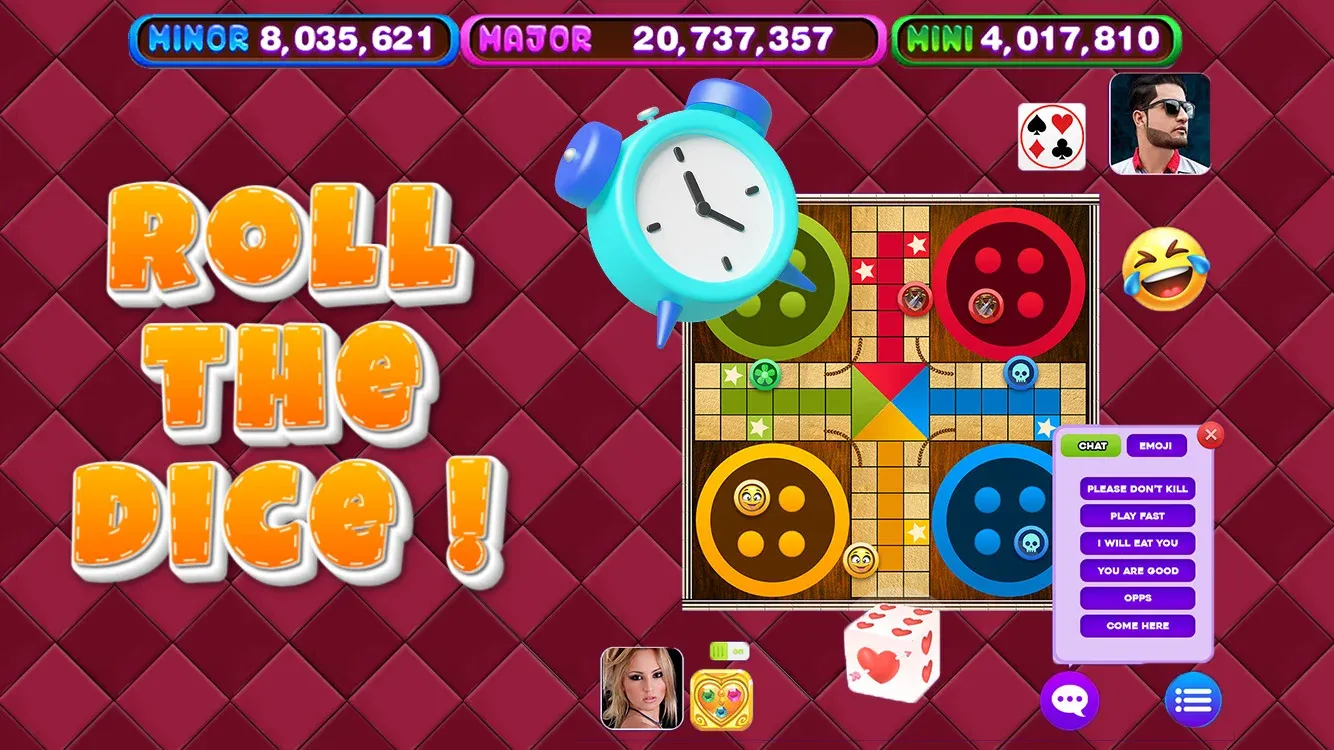
Intensa acción multijugador: juega contra amigos en partidas multijugador en tiempo real o prueba tus habilidades contra desafiantes oponentes de IA.
Juego personalizable: elige entre una variedad de conjuntos de reglas y diseños de tablero para adaptar el juego a tus preferencias.
Recompensas desbloqueables: gana monedas y desbloquea nuevos y emocionantes temas de tablero y diseños de fichas a medida que avanzas en el juego.
Tablas de clasificación mundiales: compite por el primer puesto en las tablas de clasificación mundiales y demuestra tu dominio como el campeón definitivo de parchís.
Características sociales: conéctate con amigos, envía regalos y chatea con oponentes mientras te abres camino hacia la victoria.
Juego personalizable: elige entre una variedad de conjuntos de reglas y diseños de tablero para adaptar el juego a tus preferencias.
Recompensas desbloqueables: gana monedas y desbloquea nuevos y emocionantes temas de tablero y diseños de fichas a medida que avanzas en el juego.
Tablas de clasificación mundiales: compite por el primer puesto en las tablas de clasificación mundiales y demuestra tu dominio como el campeón definitivo de parchís.
Características sociales: conéctate con amigos, envía regalos y chatea con oponentes mientras te abres camino hacia la victoria.
แท็ก
ข้อมูลเพิ่มเติม
เวอร์ชันล่าสุด:
1.0.0
หมวดหมู่:
Puzzleเสนอโดย:
Scarecrow Party
พร้อมใช้งานใน:

เกมนี้อัปโหลดโดยผู้ใช้เอง โดย LeLeJoy เพียงให้บิการเก็บข้อมูลเท่านั้น หากมีปัญหาเกี่ยวกับลิขสิทธิ์ โปรดติดต่อ [email protected] และเราจะดำเนินการอย่างทันท่วงที
ข้อมูลเพิ่มเติม
เวอร์ชันล่าสุด:
1.0.0
หมวดหมู่:
Puzzleเสนอโดย:
Scarecrow Party
พร้อมใช้งานใน:
เกมนี้อัปโหลดโดยผู้ใช้เอง โดย LeLeJoy เพียงให้บิการเก็บข้อมูลเท่านั้น หากมีปัญหาเกี่ยวกับลิขสิทธิ์ โปรดติดต่อ [email protected] และเราจะดำเนินการอย่างทันท่วงที
คล้ายกับ Ludo Battle










แนะนำสำหรับคุณ






Ludo Battle FAQ
1.How do I join a multiplayer game in Ludo Battle?
To join a multiplayer game, tap the 'Multiplayer' button, select a game mode, and wait for other players to join. Once enough players are available, the game will start.
2.Can I customize my pieces in Ludo Battle?
Yes, you can customize your pieces by going to the 'Settings' menu, selecting 'Customize', and choosing from various designs and colors.
3.What is the objective of the game in Ludo Battle?
The objective of the game is to be the first player to move all four of your pieces from the starting point to the home area. The first player to achieve this wins the game.
4.How do I roll the dice in Ludo Battle?
To roll the dice, tap the 'Roll' button. You can also choose to 'Auto Roll' if you prefer not to manually roll the dice.
Ludo Battle FAQ
1.How do I join a multiplayer game in Ludo Battle?
To join a multiplayer game, tap the 'Multiplayer' button, select a game mode, and wait for other players to join. Once enough players are available, the game will start.
2.Can I customize my pieces in Ludo Battle?
Yes, you can customize your pieces by going to the 'Settings' menu, selecting 'Customize', and choosing from various designs and colors.
3.What is the objective of the game in Ludo Battle?
The objective of the game is to be the first player to move all four of your pieces from the starting point to the home area. The first player to achieve this wins the game.
4.How do I roll the dice in Ludo Battle?
To roll the dice, tap the 'Roll' button. You can also choose to 'Auto Roll' if you prefer not to manually roll the dice.
รีวิว
0.0
1
2
3
4
5
ให้คะแนนเกมนี้
รีวิว
ยังไม่มีรีวิว
สแกนรหัส QR เพื่อดาวน์โหลด
มาร่วมกับเรา
มาเล่นด้วยกัน
Telegram
![[object Object]](https://cfs-lele-res.lelejoy.com//xt_20231009160759/fltb_20231009160835/action_20240906150554.png)
![[object Object]](https://cfs-lele-res.lelejoy.com//xt_20231009160759/fltb_20231009160835/arcade_20240906151459.png)
![[object Object]](https://cfs-lele-res.lelejoy.com//xt_20231009160759/fltb_20231009160835/adventure_20240906150827.png)
![[object Object]](https://cfs-lele-res.lelejoy.com//xt_20231009160759/fltb_20231009160835/racing_20240906151358.png)
![[object Object]](https://cfs-lele-res.lelejoy.com//xt_20231009160759/fltb_20231009160835/cards_20240906150736.png)
![[object Object]](https://cfs-lele-res.lelejoy.com//xt_20231009160759/fltb_20231009160835/casual_20240906151116.png)
![[object Object]](https://cfs-lele-res.lelejoy.com//xt_20231009160759/fltb_20231009160835/sports1_20241231162729.png)
![[object Object]](https://cfs-lele-res.lelejoy.com//xt_20231009160759/fltb_20231009160835/educational_20240906151731.png)
![[object Object]](https://cfs-lele-res.lelejoy.com//xt_20231009160759/fltb_20231009160835/strategy_20240906151247.png)
![[object Object]](https://cfs-lele-res.lelejoy.com//xt_20231009160759/fltb_20231009160835/board_20240906151319.png)
![[object Object]](https://cfs-lele-res.lelejoy.com//xt_20231009160759/fltb_20231009160835/role playing_20240906150659.png)
![[object Object]](https://cfs-lele-res.lelejoy.com//xt_20231009160759/fltb_20231009160835/music_20240906151613.png)
![[object Object]](https://cfs-lele-res.lelejoy.com//xt_20231009160759/fltb_20231009160835/word_20240906151903.png)
![[object Object]](https://cfs-lele-res.lelejoy.com//xt_20231009160759/fltb_20231009160835/trivia_20240906151841.png)
![[object Object]](https://cfs-lele-res.lelejoy.com//xt_20231009160759/fltb_20231009160835/puzzle_20240906151806.png)
![[object Object]](https://cfs-lele-res.lelejoy.com//xt_20231009160759/fltb_20231009160835/simulation_20240906151428.png)

