

English
Ludo Battle v1.0.0
1.0.0
संस्करण
6 फ़र. 2024
अपडेट किया गया
0
डाउनलोड
84.05MB
आकार
साझा करें Ludo Battle
तेजी से डाउनलोड
के बारे में Ludo Battle
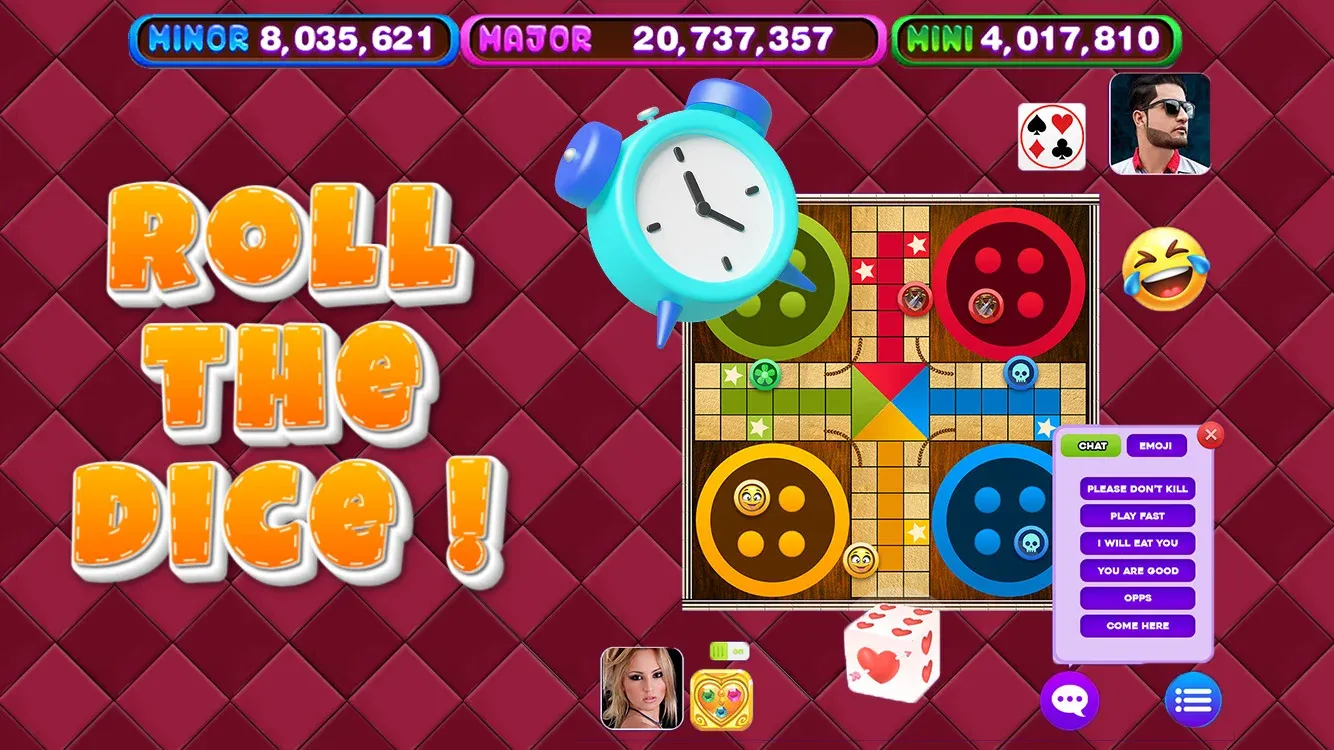
तीव्र मल्टीप्लेयर एक्शन: वास्तविक समय के मल्टीप्लेयर मैचों में दोस्तों के खिलाफ खेलें या चुनौतीपूर्ण एआई विरोधियों के खिलाफ अपने कौशल का परीक्षण करें।
अनुकूलन योग्य गेमप्ले: गेम को अपनी प्राथमिकताओं के अनुरूप बनाने के लिए विभिन्न प्रकार के नियम सेट और बोर्ड डिज़ाइन में से चुनें।
अनलॉक करने योग्य पुरस्कार: जैसे-जैसे आप गेम में आगे बढ़ते हैं, सिक्के अर्जित करें और रोमांचक नए बोर्ड थीम और टोकन डिज़ाइन अनलॉक करें।
वैश्विक लीडरबोर्ड: वैश्विक लीडरबोर्ड पर शीर्ष स्थान के लिए प्रतिस्पर्धा करें और अंतिम लूडो चैंपियन के रूप में अपना प्रभुत्व साबित करें।
सामाजिक विशेषताएं: जब आप जीत की ओर बढ़ रहे हों तो दोस्तों से जुड़ें, उपहार भेजें और विरोधियों से चैट करें।
अनुकूलन योग्य गेमप्ले: गेम को अपनी प्राथमिकताओं के अनुरूप बनाने के लिए विभिन्न प्रकार के नियम सेट और बोर्ड डिज़ाइन में से चुनें।
अनलॉक करने योग्य पुरस्कार: जैसे-जैसे आप गेम में आगे बढ़ते हैं, सिक्के अर्जित करें और रोमांचक नए बोर्ड थीम और टोकन डिज़ाइन अनलॉक करें।
वैश्विक लीडरबोर्ड: वैश्विक लीडरबोर्ड पर शीर्ष स्थान के लिए प्रतिस्पर्धा करें और अंतिम लूडो चैंपियन के रूप में अपना प्रभुत्व साबित करें।
सामाजिक विशेषताएं: जब आप जीत की ओर बढ़ रहे हों तो दोस्तों से जुड़ें, उपहार भेजें और विरोधियों से चैट करें।
टैग्स
अतिरिक्त जानकारी
नवीनतम संस्करण:
1.0.0
श्रेणी:
पहेलीइन्होंने ऑफ़र किया:
Scarecrow Party
उपलब्ध पर:

यह गेम उपयोगकर्ताओं द्वारा अपलोड किया गया है, और LeLeJoy केवल संग्रहण सेवा प्रदान करता है। यदि कोई कॉपीराइट मुद्दे हों, तो कृपया [email protected] पर संपर्क करें, और हम इसे तत्काल संबोधित करेंगे।
अतिरिक्त जानकारी
नवीनतम संस्करण:
1.0.0
श्रेणी:
पहेलीइन्होंने ऑफ़र किया:
Scarecrow Party
उपलब्ध पर:
यह गेम उपयोगकर्ताओं द्वारा अपलोड किया गया है, और LeLeJoy केवल संग्रहण सेवा प्रदान करता है। यदि कोई कॉपीराइट मुद्दे हों, तो कृपया [email protected] पर संपर्क करें, और हम इसे तत्काल संबोधित करेंगे।
समान है Ludo Battle










आपके लिए अनुशंसित






Ludo Battle FAQ
1.How do I join a multiplayer game in Ludo Battle?
To join a multiplayer game, tap the 'Multiplayer' button, select a game mode, and wait for other players to join. Once enough players are available, the game will start.
2.Can I customize my pieces in Ludo Battle?
Yes, you can customize your pieces by going to the 'Settings' menu, selecting 'Customize', and choosing from various designs and colors.
3.What is the objective of the game in Ludo Battle?
The objective of the game is to be the first player to move all four of your pieces from the starting point to the home area. The first player to achieve this wins the game.
4.How do I roll the dice in Ludo Battle?
To roll the dice, tap the 'Roll' button. You can also choose to 'Auto Roll' if you prefer not to manually roll the dice.
Ludo Battle FAQ
1.How do I join a multiplayer game in Ludo Battle?
To join a multiplayer game, tap the 'Multiplayer' button, select a game mode, and wait for other players to join. Once enough players are available, the game will start.
2.Can I customize my pieces in Ludo Battle?
Yes, you can customize your pieces by going to the 'Settings' menu, selecting 'Customize', and choosing from various designs and colors.
3.What is the objective of the game in Ludo Battle?
The objective of the game is to be the first player to move all four of your pieces from the starting point to the home area. The first player to achieve this wins the game.
4.How do I roll the dice in Ludo Battle?
To roll the dice, tap the 'Roll' button. You can also choose to 'Auto Roll' if you prefer not to manually roll the dice.
समीक्षाएँ
0.0
1
2
3
4
5
इस खेल को रेट करें
समीक्षाएँ
अभी तक कोई समीक्षा नहीं
डाउनलोड करने के लिए QR कोड स्कैन करें
हमसे जुड़ें
चलो साथ खेलें
Telegram
![[object Object]](https://cfs-lele-res.lelejoy.com//xt_20231009160759/fltb_20231009160835/arcade_20240906151459.png)
![[object Object]](https://cfs-lele-res.lelejoy.com//xt_20231009160759/fltb_20231009160835/cards_20240906150736.png)
![[object Object]](https://cfs-lele-res.lelejoy.com//xt_20231009160759/fltb_20231009160835/sports1_20241231162729.png)
![[object Object]](https://cfs-lele-res.lelejoy.com//xt_20231009160759/fltb_20231009160835/action_20240906150554.png)
![[object Object]](https://cfs-lele-res.lelejoy.com//xt_20231009160759/fltb_20231009160835/board_20240906151319.png)
![[object Object]](https://cfs-lele-res.lelejoy.com//xt_20231009160759/fltb_20231009160835/racing_20240906151358.png)
![[object Object]](https://cfs-lele-res.lelejoy.com//xt_20231009160759/fltb_20231009160835/puzzle_20240906151806.png)
![[object Object]](https://cfs-lele-res.lelejoy.com//xt_20231009160759/fltb_20231009160835/role playing_20240906150659.png)
![[object Object]](https://cfs-lele-res.lelejoy.com//xt_20231009160759/fltb_20231009160835/strategy_20240906151247.png)
![[object Object]](https://cfs-lele-res.lelejoy.com//xt_20231009160759/fltb_20231009160835/casual_20240906151116.png)
![[object Object]](https://cfs-lele-res.lelejoy.com//xt_20231009160759/fltb_20231009160835/word_20240906151903.png)
![[object Object]](https://cfs-lele-res.lelejoy.com//xt_20231009160759/fltb_20231009160835/educational_20240906151731.png)
![[object Object]](https://cfs-lele-res.lelejoy.com//xt_20231009160759/fltb_20231009160835/music_20240906151613.png)
![[object Object]](https://cfs-lele-res.lelejoy.com//xt_20231009160759/fltb_20231009160835/trivia_20240906151841.png)
![[object Object]](https://cfs-lele-res.lelejoy.com//xt_20231009160759/fltb_20231009160835/adventure_20240906150827.png)
![[object Object]](https://cfs-lele-res.lelejoy.com//xt_20231009160759/fltb_20231009160835/simulation_20240906151428.png)

