

English

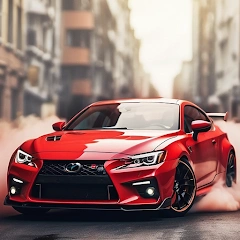
Drift Car City Traffic Racing v1.4
1.4
संस्करण
22 मार्च 2024
अपडेट किया गया
0
डाउनलोड
55.55MB
आकार
साझा करें Drift Car City Traffic Racing
तेजी से डाउनलोड
नया क्या है
Drift car city traffic racing fever 2018 features:
-Super sense of speed
-Realistic simulation engine
-Choose your favorite models
-Free car racing driving gameplay.
-A variety of vehicles to choose any of you
-Drive fast boost your speed.
-Smooth control with precise steering
-Super sense of speed
-Realistic simulation engine
-Choose your favorite models
-Free car racing driving gameplay.
-A variety of vehicles to choose any of you
-Drive fast boost your speed.
-Smooth control with precise steering
अतिरिक्त जानकारी
नवीनतम संस्करण:
1.4
श्रेणी:
दौड़इन्होंने ऑफ़र किया:
iExtend Games
उपलब्ध पर:

यह गेम उपयोगकर्ताओं द्वारा अपलोड किया गया है, और LeLeJoy केवल संग्रहण सेवा प्रदान करता है। यदि कोई कॉपीराइट मुद्दे हों, तो कृपया [email protected] पर संपर्क करें, और हम इसे तत्काल संबोधित करेंगे।
अतिरिक्त जानकारी
नवीनतम संस्करण:
1.4
श्रेणी:
दौड़इन्होंने ऑफ़र किया:
iExtend Games
उपलब्ध पर:
यह गेम उपयोगकर्ताओं द्वारा अपलोड किया गया है, और LeLeJoy केवल संग्रहण सेवा प्रदान करता है। यदि कोई कॉपीराइट मुद्दे हों, तो कृपया [email protected] पर संपर्क करें, और हम इसे तत्काल संबोधित करेंगे।
समान है Drift Car City Traffic Racing


आपके लिए अनुशंसित

Drift Car City Traffic Racing FAQ
1.How do I control my car in Drift Car City Traffic Racing?
Use the touch controls on your screen to steer, accelerate, and brake. Tap the left side of the screen to turn left, right side for right turns. Press and hold the accelerator button to speed up and the brake button to slow down or stop.
2.Can I customize my car in Drift Car City Traffic Racing?
Yes, you can customize your car's look with different colors, decals, and wheels from the garage menu. Some customizations may require in-game currency or real money purchases.
3.What are the drifting mechanics in Drift Car City Traffic Racing?
To perform a drift, tap and hold the brake button while turning. Keep holding to maintain the drift. Timing is key for achieving longer drifts and earning more points.
4.How do I unlock new cars in Drift Car City Traffic Racing?
Unlock new cars by completing missions, reaching certain levels, or purchasing them with in-game currency or real money in the shop.
Drift Car City Traffic Racing FAQ
1.How do I control my car in Drift Car City Traffic Racing?
Use the touch controls on your screen to steer, accelerate, and brake. Tap the left side of the screen to turn left, right side for right turns. Press and hold the accelerator button to speed up and the brake button to slow down or stop.
2.Can I customize my car in Drift Car City Traffic Racing?
Yes, you can customize your car's look with different colors, decals, and wheels from the garage menu. Some customizations may require in-game currency or real money purchases.
3.What are the drifting mechanics in Drift Car City Traffic Racing?
To perform a drift, tap and hold the brake button while turning. Keep holding to maintain the drift. Timing is key for achieving longer drifts and earning more points.
4.How do I unlock new cars in Drift Car City Traffic Racing?
Unlock new cars by completing missions, reaching certain levels, or purchasing them with in-game currency or real money in the shop.
समीक्षाएँ
0.0
1
2
3
4
5
इस खेल को रेट करें
समीक्षाएँ
अभी तक कोई समीक्षा नहीं
डाउनलोड करने के लिए QR कोड स्कैन करें
हमसे जुड़ें
चलो साथ खेलें
Telegram
![[object Object]](https://cfs-lele-res.lelejoy.com//xt_20231009160759/fltb_20231009160835/arcade_20240906151459.png)
![[object Object]](https://cfs-lele-res.lelejoy.com//xt_20231009160759/fltb_20231009160835/cards_20240906150736.png)
![[object Object]](https://cfs-lele-res.lelejoy.com//xt_20231009160759/fltb_20231009160835/sports1_20241231162729.png)
![[object Object]](https://cfs-lele-res.lelejoy.com//xt_20231009160759/fltb_20231009160835/action_20240906150554.png)
![[object Object]](https://cfs-lele-res.lelejoy.com//xt_20231009160759/fltb_20231009160835/board_20240906151319.png)
![[object Object]](https://cfs-lele-res.lelejoy.com//xt_20231009160759/fltb_20231009160835/racing_20240906151358.png)
![[object Object]](https://cfs-lele-res.lelejoy.com//xt_20231009160759/fltb_20231009160835/puzzle_20240906151806.png)
![[object Object]](https://cfs-lele-res.lelejoy.com//xt_20231009160759/fltb_20231009160835/role playing_20240906150659.png)
![[object Object]](https://cfs-lele-res.lelejoy.com//xt_20231009160759/fltb_20231009160835/strategy_20240906151247.png)
![[object Object]](https://cfs-lele-res.lelejoy.com//xt_20231009160759/fltb_20231009160835/casual_20240906151116.png)
![[object Object]](https://cfs-lele-res.lelejoy.com//xt_20231009160759/fltb_20231009160835/word_20240906151903.png)
![[object Object]](https://cfs-lele-res.lelejoy.com//xt_20231009160759/fltb_20231009160835/educational_20240906151731.png)
![[object Object]](https://cfs-lele-res.lelejoy.com//xt_20231009160759/fltb_20231009160835/music_20240906151613.png)
![[object Object]](https://cfs-lele-res.lelejoy.com//xt_20231009160759/fltb_20231009160835/trivia_20240906151841.png)
![[object Object]](https://cfs-lele-res.lelejoy.com//xt_20231009160759/fltb_20231009160835/adventure_20240906150827.png)
![[object Object]](https://cfs-lele-res.lelejoy.com//xt_20231009160759/fltb_20231009160835/simulation_20240906151428.png)

